> For the complete documentation index, see [llms.txt](https://docs.jua.ai/llms.txt). Markdown versions of documentation pages are available by appending `.md` to page URLs; this page is available as [Markdown](https://docs.jua.ai/python-sdk/market-aggregates.md).
# Market Aggregates
Market aggregates, especially used with weighting such as capacity weighting, are useful proxies to estimate how differences in forecasts - either between models or between different forecasts of the same model - impact energy production & consumption. For more information about market aggregates, see the [Market Aggregates](/api-v2/query-engine/market-aggregates.md) page.
Market aggregates can be queried directly through the Jua Python SDK, using the `MarketAggregates` class.
## Example
As an introduction to market aggregates in the SDK, see this simple example. For more examples, please see [our GitHub repository](https://github.com/juaAI/jua-python-sdk/tree/main/examples/market_aggregates).
```python
from datetime import datetime
import matplotlib.pyplot as plt
from jua import JuaClient
from jua.market_aggregates import AggregateVariables, ModelRuns
from jua.types import MarketZones
from jua.weather import Models
client = JuaClient()
# Create an energy market for specific zones
germany = client.market_aggregates.get_market(market_zone=MarketZones.DE)
# Select two EPT-2 forecasts and two ECMWF IFS forecasts to compare
model_runs = [
ModelRuns(
Models.EPT2,
[
datetime(2025, 9, 29, 0),
datetime(2025, 9, 29, 6),
]
),
ModelRuns(
Models.ECMWF_IFS_SINGLE,
[
datetime(2025, 9, 29, 0),
datetime(2025, 9, 29, 6),
]
),
]
# Retrieve the 2-day 10m wind market aggregates for Germany
# An xarray.Dataset is returned, containing the market aggregates
# for each model run
wind_data = germany.compare_runs(
agg_variable=AggregateVariables.WIND_SPEED_AT_HEIGHT_LEVEL_10M,
model_runs=model_runs,
max_lead_time=48,
)
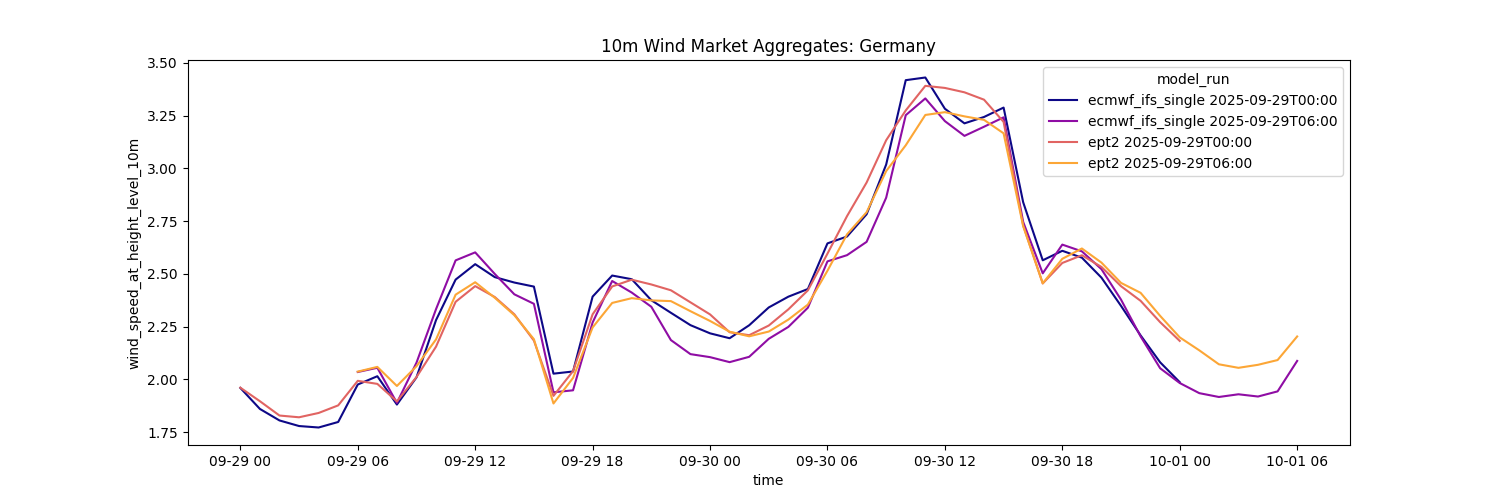
# Plot the 4 market aggregates using matplotlib
fig, ax = plt.subplots(figsize=(15, 5))
wind_data["wind_speed_at_height_level_10m"].plot(ax=ax, x="time", hue="model_run")
ax.set_title("10m Wind Market Aggregates: Germany")
plt.show()
```
This will plot the following:
## Documentation
### Aggregate Variables
The `AggregateVariables` enum provides the following variables:
* `AggregateVariables.WIND_SPEED_AT_HEIGHT_LEVEL_10M`
* `AggregateVariables.WIND_SPEED_AT_HEIGHT_LEVEL_100M`
* `AggregateVariables.SURFACE_DOWNWELLING_SHORTWAVE_FLUX_SUM_1H`
* `AggregateVariables.AIR_TEMPERATURE_AT_HEIGHT_LEVEL_2M`
Aggregate variables automatically uses the appropriate weighting from the `Weighting` enum:
* **Wind variables** use `Weighting.WIND_CAPACITY`
* **Solar variables** use `Weighting.SOLAR_CAPACITY`
* **Temperature** uses `Weighting.POPULATION`
Example:
{% tabs %}
{% tab title="Accessing all available AggregateVariables" %}
```python
# Listing all available AggregateVariables
print("Available AggregateVariables:")
for var in AggregateVariables:
print(f" - variable: {var}")
```
{% endtab %}
{% tab title="Output" %}
```
Available AggregateVariables:
- variable: AggregateVariables.AIR_TEMPERATURE_AT_HEIGHT_LEVEL_2M
- variable: AggregateVariables.SURFACE_DOWNWELLING_SHORTWAVE_FLUX_SUM_1H
- variable: AggregateVariables.WIND_SPEED_AT_HEIGHT_LEVEL_10M
- variable: AggregateVariables.WIND_SPEED_AT_HEIGHT_LEVEL_100M
```
{% endtab %}
{% endtabs %}
### Energy Market
An `EnergyMarket` provides access to spatially aggregated forecast data for specific market zones. Data is weighted by the appropriate factor (wind capacity, solar capacity, or population) depending on the variable requested. This is useful for energy market analysis where you need regionally aggregated forecasts.
```
Attributes:
client: JuaClient
The JuaClient instance for API communication.
market_zone: MarketZones | str | list[MarketZones | str]
The market zones or list of market zones to aggregate data for.
Methods:
compare_runs():
Attributes:
agg_variable: AggregateVariable | AggregateVariables
The AggregateVariable specifying which variable to query.
model_runs: list[ModelRuns]
List of ModelRuns instances specifying which model forecasts to
query. Each ModelRuns contains a model and one or more init_times
(datetimes or non-negative integers).
min_lead_time: int
Minimum forecast lead time in hours (default: 0).
max_lead_time: int | None
Maximum forecast lead time in hours. If None, returns
all available lead times.
temporal_aggregation: TemporalAggregation | None
Optional temporal resampling configuration. When provided,
the `time` dimension is resampled to the specified frequency
(e.g. daily) using the chosen method (e.g. mean, sum).
Returns:
xarray.Dataset containing `model_run` and `time` dimensions, with
`prediction_timedelta` and the queried variable as data_vars.
compare_runs_mw():
Like compare_runs(), but returns predicted megawatt (MW) values
instead of raw weather variables. Takes a `weighting` argument
instead of `agg_variable`. It also accepts `debias: bool = False`
to opt into walk-forward MW bias correction (see
[Power Forecast](../models-and-products/power-forecast.md#optional-walk-forward-debiasing)).
See the MW Output section below.
```
Examples:
```python
from datetime import datetime
from jua import JuaClient
from jua.market_aggregates import AggregateVariables, ModelRuns
from jua.types import MarketZones
from jua.weather import Models
client = JuaClient()
# Create an energy market for specific zones
germany = client.market_aggregates.get_market(market_zone=MarketZones.DE)
# Select two EPT-2 forecasts and two ECMWF IFS forecasts to compare
model_runs = [ModelRuns(Models.EPT2, [0, 1])]
# Retrieve the 2-day 10m wind market aggregates for Germany
wind_data = germany.compare_runs(
agg_variable=AggregateVariables.SURFACE_DOWNWELLING_SHORTWAVE_FLUX_SUM_1H,
model_runs=model_runs,
max_lead_time=48,
)
```
### MW Output
`compare_runs_mw()` returns predicted **megawatts (MW)** instead of raw weather values. This is useful for comparing different models and quick MW estimates across many European zones.
```python
from jua import JuaClient
from jua.market_aggregates import ModelRuns
from jua.types import MarketZones
from jua.weather import Models
client = JuaClient()
germany = client.market_aggregates.get_market(market_zone=MarketZones.DE)
# Wind production in MW for the two most recent EPT-2 runs
wind_mw = germany.compare_runs_mw(
weighting="wind_capacity",
model_runs=[ModelRuns(Models.EPT2, [0, 1])],
max_lead_time=48,
debias=True,
)
print(list(wind_mw.data_vars))
# ['prediction_timedelta', 'market_zone', 'wind_onshore_mw', 'wind_offshore_mw']
```
Instead of `agg_variable`, `compare_runs_mw()` takes a `weighting`, which determines the returned data variables:
| Weighting | Data variables |
| ------------------ | --------------------------------------------------------- |
| `"wind_capacity"` | `wind_onshore_mw`, `wind_offshore_mw`, or `wind_total_mw` |
| `"solar_capacity"` | `solar_mw` |
Zones with a single combined wind capacity return `wind_total_mw` (today: `GB` only). Zones with only onshore capacity return `wind_offshore_mw` with `None` values.
The returned `xarray.Dataset` has the same `model_run` and `time` dimensions as `compare_runs()`, with `unit` set to `"MW"` in its attributes.
Examples pass `debias=True` to apply the same [walk-forward correction](/models-and-products/power-forecast.md#optional-walk-forward-debiasing) as Power Forecast: eight weeks of history for wind and four weeks for solar and load to estimate the bias for each init time and lead; that bias is subtracted from the current forecast, then the window moves ahead. The API default is still raw (`debias=False`).
{% hint style="info" %}
**Looking for actual production forecasts?** MW output provides a forecast of **potential production**. For a forecast of **actual production**, use the [Power Forecast](/python-sdk/power-forecast.md) — significantly more accurate, and currently available for Germany, France, United Kingdom, Belgium, and Netherlands (Solar, Wind).
{% endhint %}
#### MW-capable zones
MW output is available for a subset of market zones. The list grows over time as new zones are onboarded, so query it rather than hard-coding a list:
```python
mw_zones = client.market_aggregates.get_mw_zones()
print(mw_zones["wind"]) # ['AT', 'BA', 'BE', 'BG', 'CH', 'CY', 'CZ', 'DE', ...]
print(mw_zones["solar"]) # ['AT', 'BA', 'BE', 'BG', 'CH', 'CY', 'CZ', 'DE', ...]
```
* `wind` — zones supporting `"wind_capacity"` weighting
* `solar` — zones supporting `"solar_capacity"` weighting
### Temporal Aggregation
By default, market aggregates are returned at hourly resolution. Pass a `TemporalAggregation` to resample the `time` dimension into daily or weekly buckets. This works with both `compare_runs()` and `compare_runs_mw()`.
```python
from jua.market_aggregates import (
AggregateVariables,
AggregationFrequency,
AggregationMethod,
ModelRuns,
TemporalAggregation,
)
# Daily mean wind speed over a 5-day forecast
daily = germany.compare_runs(
agg_variable=AggregateVariables.WIND_SPEED_AT_HEIGHT_LEVEL_100M,
model_runs=[ModelRuns(Models.EPT2, 0)],
max_lead_time=120,
temporal_aggregation=TemporalAggregation(
AggregationFrequency.DAILY,
AggregationMethod.MEAN,
),
)
# Daily total solar production
daily_solar = germany.compare_runs_mw(
weighting="solar_capacity",
model_runs=[ModelRuns(Models.EPT2, 0)],
max_lead_time=120,
temporal_aggregation=TemporalAggregation(
AggregationFrequency.DAILY,
AggregationMethod.SUM,
),
debias=True,
)
```
`AggregationFrequency` supports `DAILY` and `WEEKLY`. `AggregationMethod` supports `MEAN` (the default if omitted), `SUM`, `MIN` and `MAX`.
`prediction_timedelta` is not included in the returned dataset when temporal aggregation is applied.
### Market Zones
The `MarketZones` is a simple helper Enum containing the available market zones for market aggregate queries.
Example:
{% tabs %}
{% tab title="List Available MarketZones" %}
```python
from jua.types import MarketZones
print("Available MarketZones:")
for market_zone in MarketZones:
print(f" - {market_zone.name} (country: {market_zone.country})")
```
{% endtab %}
{% tab title="Output" %}
```
Available MarketZones:
- AD (country: Countries.ANDORRA)
- AE (country: Countries.UNITED_ARAB_EMIRATES)
- AF (country: Countries.AFGHANISTAN)
- AG (country: Countries.ANTIGUA_AND_BARBUDA)
- AL (country: Countries.ALBANIA)
- AM (country: Countries.ARMENIA)
- AO (country: Countries.ANGOLA)
- AR (country: Countries.ARGENTINA)
- AT (country: Countries.AUSTRIA)
- AU_LH (country: Countries.AUSTRALIA)
- AU_NSW (country: Countries.AUSTRALIA)
- AU_NT (country: Countries.AUSTRALIA)
- AU_QLD (country: Countries.AUSTRALIA)
- AU_SA (country: Countries.AUSTRALIA)
- AU_TAS (country: Countries.AUSTRALIA)
- AU_TAS_CBI (country: Countries.AUSTRALIA)
- AU_TAS_FI (country: Countries.AUSTRALIA)
- AU_TAS_KI (country: Countries.AUSTRALIA)
- AU_VIC (country: Countries.AUSTRALIA)
- AU_WA (country: Countries.AUSTRALIA)
- AW (country: Countries.ARUBA)
- AX (country: Countries.ALAND_ISLANDS)
- AZ (country: Countries.AZERBAIJAN)
- BA (country: Countries.BOSNIA_AND_HERZEGOVINA)
- BB (country: Countries.BARBADOS)
- BD (country: Countries.BANGLADESH)
- BE (country: Countries.BELGIUM)
- BF (country: Countries.BURKINA_FASO)
- BG (country: Countries.BULGARIA)
- BH (country: Countries.BAHRAIN)
- BI (country: Countries.BURUNDI)
- BJ (country: Countries.BENIN)
- BM (country: Countries.BERMUDA)
- BN (country: Countries.BRUNEI_DARUSSALAM)
- BO (country: Countries.BOLIVIA_PLURINATIONAL_STATE_OF)
- BR_CS (country: Countries.BRAZIL)
- BR_N (country: Countries.BRAZIL)
- BR_NE (country: Countries.BRAZIL)
- BR_S (country: Countries.BRAZIL)
- BS (country: Countries.BAHAMAS)
- BT (country: Countries.BHUTAN)
- BW (country: Countries.BOTSWANA)
- BY (country: Countries.BELARUS)
- BZ (country: Countries.BELIZE)
- CA_AB (country: Countries.CANADA)
- CA_BC (country: Countries.CANADA)
- CA_MB (country: Countries.CANADA)
- CA_NB (country: Countries.CANADA)
- CA_NL (country: Countries.CANADA)
- CA_NS (country: Countries.CANADA)
- CA_NT (country: Countries.CANADA)
- CA_NU (country: Countries.CANADA)
- CA_ON (country: Countries.CANADA)
- CA_PE (country: Countries.CANADA)
- CA_QC (country: Countries.CANADA)
- CA_SK (country: Countries.CANADA)
- CA_YT (country: Countries.CANADA)
- CD (country: Countries.CONGO_THE_DEMOCRATIC_REPUBLIC_OF_THE)
- CF (country: Countries.CENTRAL_AFRICAN_REPUBLIC)
- CG (country: Countries.CONGO)
- CH (country: Countries.SWITZERLAND)
- CI (country: Countries.COTE_DIVOIRE)
- CL_CHP (country: Countries.CHILE)
- CL_SEA (country: Countries.CHILE)
- CL_SEM (country: Countries.CHILE)
- CL_SEN (country: Countries.CHILE)
- CM (country: Countries.CAMEROON)
- CN (country: Countries.CHINA)
- CO (country: Countries.COLOMBIA)
- CR (country: Countries.COSTA_RICA)
- CU (country: Countries.CUBA)
- CV (country: Countries.CABO_VERDE)
- CW (country: Countries.CURACAO)
- CY (country: Countries.CYPRUS)
- CZ (country: Countries.CZECHIA)
- DE (country: Countries.GERMANY)
- DJ (country: Countries.DJIBOUTI)
- DK_BHM (country: Countries.DENMARK)
- DK_DK1 (country: Countries.DENMARK)
- DK_DK2 (country: Countries.DENMARK)
- DM (country: Countries.DOMINICA)
- DO (country: Countries.DOMINICAN_REPUBLIC)
- DZ (country: Countries.ALGERIA)
- EC (country: Countries.ECUADOR)
- EE (country: Countries.ESTONIA)
- EG (country: Countries.EGYPT)
- EH (country: Countries.WESTERN_SAHARA)
- ER (country: Countries.ERITREA)
- ES (country: Countries.SPAIN)
- ES_CN_FV (country: Countries.SPAIN)
- ES_CN_GC (country: Countries.SPAIN)
- ES_CN_HI (country: Countries.SPAIN)
- ES_CN_IG (country: Countries.SPAIN)
- ES_CN_LP (country: Countries.SPAIN)
- ES_CN_LZ (country: Countries.SPAIN)
- ES_CN_TE (country: Countries.SPAIN)
- ES_IB_FO (country: Countries.SPAIN)
- ES_IB_IZ (country: Countries.SPAIN)
- ES_IB_MA (country: Countries.SPAIN)
- ES_IB_ME (country: Countries.SPAIN)
- ET (country: Countries.ETHIOPIA)
- FI (country: Countries.FINLAND)
- FJ (country: Countries.FIJI)
- FK (country: Countries.FALKLAND_ISLANDS_MALVINAS)
- FM (country: Countries.MICRONESIA_FEDERATED_STATES_OF)
- FO_MI (country: Countries.FAROE_ISLANDS)
- FO_SI (country: Countries.FAROE_ISLANDS)
- FR (country: Countries.FRANCE)
- FR_COR (country: Countries.FRANCE)
- GA (country: Countries.GABON)
- GB (country: Countries.UNITED_KINGDOM)
- GB_NIR (country: Countries.UNITED_KINGDOM)
- GB_ORK (country: Countries.UNITED_KINGDOM)
- GB_ZET (country: Countries.UNITED_KINGDOM)
- GE (country: Countries.GEORGIA)
- GF (country: Countries.FRENCH_GUIANA)
- GG (country: Countries.GUERNSEY)
- GH (country: Countries.GHANA)
- GL (country: Countries.GREENLAND)
- GM (country: Countries.GAMBIA)
- GN (country: Countries.GUINEA)
- GP (country: Countries.GUADELOUPE)
- GQ (country: Countries.EQUATORIAL_GUINEA)
- GR (country: Countries.GREECE)
- GT (country: Countries.GUATEMALA)
- GU (country: Countries.GUAM)
- GW (country: Countries.GUINEA_BISSAU)
- GY (country: Countries.GUYANA)
- HK (country: Countries.HONG_KONG)
- HN (country: Countries.HONDURAS)
- HR (country: Countries.CROATIA)
- HT (country: Countries.HAITI)
- HU (country: Countries.HUNGARY)
- ID (country: Countries.INDONESIA)
- IE (country: Countries.IRELAND)
- IL (country: Countries.ISRAEL)
- IM (country: Countries.ISLE_OF_MAN)
- IN_AN (country: Countries.INDIA)
- IN_EA (country: Countries.INDIA)
- IN_NE (country: Countries.INDIA)
- IN_NO (country: Countries.INDIA)
- IN_SO (country: Countries.INDIA)
- IN_WE (country: Countries.INDIA)
- IQ (country: Countries.IRAQ)
- IR (country: Countries.IRAN_ISLAMIC_REPUBLIC_OF)
- IS (country: Countries.ICELAND)
- IT_CNO (country: Countries.ITALY)
- IT_CSO (country: Countries.ITALY)
- IT_NO (country: Countries.ITALY)
- IT_SAR (country: Countries.ITALY)
- IT_SIC (country: Countries.ITALY)
- IT_SO (country: Countries.ITALY)
- JE (country: Countries.JERSEY)
- JM (country: Countries.JAMAICA)
- JO (country: Countries.JORDAN)
- JP_CB (country: Countries.JAPAN)
- JP_CG (country: Countries.JAPAN)
- JP_HKD (country: Countries.JAPAN)
- JP_HR (country: Countries.JAPAN)
- JP_KN (country: Countries.JAPAN)
- JP_KY (country: Countries.JAPAN)
- JP_ON (country: Countries.JAPAN)
- JP_SK (country: Countries.JAPAN)
- JP_TH (country: Countries.JAPAN)
- JP_TK (country: Countries.JAPAN)
- KE (country: Countries.KENYA)
- KG (country: Countries.KYRGYZSTAN)
- KH (country: Countries.CAMBODIA)
- KM (country: Countries.COMOROS)
- KP (country: Countries.KOREA_DEMOCRATIC_PEOPLES_REPUBLIC_OF)
- KR (country: Countries.KOREA_REPUBLIC_OF)
- KW (country: Countries.KUWAIT)
- KY (country: Countries.CAYMAN_ISLANDS)
- KZ (country: Countries.KAZAKHSTAN)
- LA (country: Countries.LAO_PEOPLES_DEMOCRATIC_REPUBLIC)
- LB (country: Countries.LEBANON)
- LC (country: Countries.SAINT_LUCIA)
- LI (country: Countries.LIECHTENSTEIN)
- LK (country: Countries.SRI_LANKA)
- LR (country: Countries.LIBERIA)
- LS (country: Countries.LESOTHO)
- LT (country: Countries.LITHUANIA)
- LU (country: Countries.LUXEMBOURG)
- LV (country: Countries.LATVIA)
- LY (country: Countries.LIBYA)
- MA (country: Countries.MOROCCO)
- MD (country: Countries.MOLDOVA_REPUBLIC_OF)
- ME (country: Countries.MONTENEGRO)
- MG (country: Countries.MADAGASCAR)
- MK (country: Countries.NORTH_MACEDONIA)
- ML (country: Countries.MALI)
- MM (country: Countries.MYANMAR)
- MN (country: Countries.MONGOLIA)
- MQ (country: Countries.MARTINIQUE)
- MR (country: Countries.MAURITANIA)
- MT (country: Countries.MALTA)
- MU (country: Countries.MAURITIUS)
- MV (country: Countries.MALDIVES)
- MW (country: Countries.MALAWI)
- MX (country: Countries.MEXICO)
- MY_EM (country: Countries.MALAYSIA)
- MY_WM (country: Countries.MALAYSIA)
- MZ (country: Countries.MOZAMBIQUE)
- NA (country: Countries.NAMIBIA)
- NC (country: Countries.NEW_CALEDONIA)
- NE (country: Countries.NIGER)
- NG (country: Countries.NIGERIA)
- NI (country: Countries.NICARAGUA)
- NL (country: Countries.NETHERLANDS)
- NO_NO1 (country: Countries.NORWAY)
- NO_NO2 (country: Countries.NORWAY)
- NO_NO3 (country: Countries.NORWAY)
- NO_NO4 (country: Countries.NORWAY)
- NO_NO5 (country: Countries.NORWAY)
- NP (country: Countries.NEPAL)
- NZ (country: Countries.NEW_ZEALAND)
- NZ_NZC (country: Countries.NEW_ZEALAND)
- NZ_NZST (country: Countries.NEW_ZEALAND)
- OM (country: Countries.OMAN)
- PA (country: Countries.PANAMA)
- PE (country: Countries.PERU)
- PF (country: Countries.FRENCH_POLYNESIA)
- PG (country: Countries.PAPUA_NEW_GUINEA)
- PH_LU (country: Countries.PHILIPPINES)
- PH_MI (country: Countries.PHILIPPINES)
- PH_VI (country: Countries.PHILIPPINES)
- PK (country: Countries.PAKISTAN)
- PL (country: Countries.POLAND)
- PM (country: Countries.SAINT_PIERRE_AND_MIQUELON)
- PR (country: Countries.PUERTO_RICO)
- PS (country: Countries.PALESTINE_STATE_OF)
- PT (country: Countries.PORTUGAL)
- PT_AC (country: Countries.PORTUGAL)
- PT_MA (country: Countries.PORTUGAL)
- PW (country: Countries.PALAU)
- PY (country: Countries.PARAGUAY)
- QA (country: Countries.QATAR)
- RE (country: Countries.REUNION)
- RO (country: Countries.ROMANIA)
- RS (country: Countries.SERBIA)
- RU_1 (country: Countries.RUSSIAN_FEDERATION)
- RU_2 (country: Countries.RUSSIAN_FEDERATION)
- RU_AS (country: Countries.RUSSIAN_FEDERATION)
- RU_EU (country: Countries.RUSSIAN_FEDERATION)
- RU_FE (country: Countries.RUSSIAN_FEDERATION)
- RU_KGD (country: Countries.RUSSIAN_FEDERATION)
- RW (country: Countries.RWANDA)
- SA (country: Countries.SAUDI_ARABIA)
- SB (country: Countries.SOLOMON_ISLANDS)
- SC (country: Countries.SEYCHELLES)
- SD (country: Countries.SUDAN)
- SE_SE1 (country: Countries.SWEDEN)
- SE_SE2 (country: Countries.SWEDEN)
- SE_SE3 (country: Countries.SWEDEN)
- SE_SE4 (country: Countries.SWEDEN)
- SG (country: Countries.SINGAPORE)
- SI (country: Countries.SLOVENIA)
- SJ (country: Countries.SVALBARD_AND_JAN_MAYEN)
- SK (country: Countries.SLOVAKIA)
- SL (country: Countries.SIERRA_LEONE)
- SN (country: Countries.SENEGAL)
- SO (country: Countries.SOMALIA)
- SR (country: Countries.SURINAME)
- SS (country: Countries.SOUTH_SUDAN)
- ST (country: Countries.SAO_TOME_AND_PRINCIPE)
- SV (country: Countries.EL_SALVADOR)
- SY (country: Countries.SYRIAN_ARAB_REPUBLIC)
- SZ (country: Countries.ESWATINI)
- TD (country: Countries.CHAD)
- TG (country: Countries.TOGO)
- TH (country: Countries.THAILAND)
- TJ (country: Countries.TAJIKISTAN)
- TL (country: Countries.TIMOR_LESTE)
- TM (country: Countries.TURKMENISTAN)
- TN (country: Countries.TUNISIA)
- TO (country: Countries.TONGA)
- TR (country: Countries.TURKEY)
- TT (country: Countries.TRINIDAD_AND_TOBAGO)
- TW (country: Countries.TAIWAN_PROVINCE_OF_CHINA)
- TZ (country: Countries.TANZANIA_UNITED_REPUBLIC_OF)
- UA (country: Countries.UKRAINE)
- UA_CR (country: Countries.UKRAINE)
- UG (country: Countries.UGANDA)
- US_AK (country: Countries.UNITED_STATES)
- US_AK_SEAPA (country: Countries.UNITED_STATES)
- US_CAL_BANC (country: Countries.UNITED_STATES)
- US_CAL_CISO (country: Countries.UNITED_STATES)
- US_CAL_IID (country: Countries.UNITED_STATES)
- US_CAL_LDWP (country: Countries.UNITED_STATES)
- US_CAL_TIDC (country: Countries.UNITED_STATES)
- US_CAR_CPLE (country: Countries.UNITED_STATES)
- US_CAR_CPLW (country: Countries.UNITED_STATES)
- US_CAR_DUK (country: Countries.UNITED_STATES)
- US_CAR_SC (country: Countries.UNITED_STATES)
- US_CAR_SCEG (country: Countries.UNITED_STATES)
- US_CENT_SPA (country: Countries.UNITED_STATES)
- US_CENT_SWPP (country: Countries.UNITED_STATES)
- US_FLA_FMPP (country: Countries.UNITED_STATES)
- US_FLA_FPC (country: Countries.UNITED_STATES)
- US_FLA_FPL (country: Countries.UNITED_STATES)
- US_FLA_GVL (country: Countries.UNITED_STATES)
- US_FLA_HST (country: Countries.UNITED_STATES)
- US_FLA_JEA (country: Countries.UNITED_STATES)
- US_FLA_SEC (country: Countries.UNITED_STATES)
- US_FLA_TAL (country: Countries.UNITED_STATES)
- US_FLA_TEC (country: Countries.UNITED_STATES)
- US_HI (country: Countries.UNITED_STATES)
- US_MIDA_PJM (country: Countries.UNITED_STATES)
- US_MIDW_AECI (country: Countries.UNITED_STATES)
- US_MIDW_LGEE (country: Countries.UNITED_STATES)
- US_MIDW_MISO (country: Countries.UNITED_STATES)
- US_NE_ISNE (country: Countries.UNITED_STATES)
- US_NW_AVA (country: Countries.UNITED_STATES)
- US_NW_BPAT (country: Countries.UNITED_STATES)
- US_NW_CHPD (country: Countries.UNITED_STATES)
- US_NW_DOPD (country: Countries.UNITED_STATES)
- US_NW_GCPD (country: Countries.UNITED_STATES)
- US_NW_IPCO (country: Countries.UNITED_STATES)
- US_NW_NEVP (country: Countries.UNITED_STATES)
- US_NW_NWMT (country: Countries.UNITED_STATES)
- US_NW_PACE (country: Countries.UNITED_STATES)
- US_NW_PACW (country: Countries.UNITED_STATES)
- US_NW_PGE (country: Countries.UNITED_STATES)
- US_NW_PSCO (country: Countries.UNITED_STATES)
- US_NW_PSEI (country: Countries.UNITED_STATES)
- US_NW_SCL (country: Countries.UNITED_STATES)
- US_NW_TPWR (country: Countries.UNITED_STATES)
- US_NW_WACM (country: Countries.UNITED_STATES)
- US_NW_WAUW (country: Countries.UNITED_STATES)
- US_NY_NYIS (country: Countries.UNITED_STATES)
- US_SE_SOCO (country: Countries.UNITED_STATES)
- US_SW_AZPS (country: Countries.UNITED_STATES)
- US_SW_EPE (country: Countries.UNITED_STATES)
- US_SW_PNM (country: Countries.UNITED_STATES)
- US_SW_SRP (country: Countries.UNITED_STATES)
- US_SW_TEPC (country: Countries.UNITED_STATES)
- US_SW_WALC (country: Countries.UNITED_STATES)
- US_TEN_TVA (country: Countries.UNITED_STATES)
- US_TEX_ERCO (country: Countries.UNITED_STATES)
- UY (country: Countries.URUGUAY)
- UZ (country: Countries.UZBEKISTAN)
- VC (country: Countries.SAINT_VINCENT_AND_THE_GRENADINES)
- VE (country: Countries.VENEZUELA_BOLIVARIAN_REPUBLIC_OF)
- VI (country: Countries.VIRGIN_ISLANDS_U_S)
- VN (country: Countries.VIET_NAM)
- VU (country: Countries.VANUATU)
- WS (country: Countries.SAMOA)
- XK (country: Countries.KOSOVO)
- XX (country: Countries.CYPRUS)
- YE (country: Countries.YEMEN)
- YT (country: Countries.MAYOTTE)
- ZA (country: Countries.SOUTH_AFRICA)
- ZM (country: Countries.ZAMBIA)
- ZW (country: Countries.ZIMBABWE)
```
{% endtab %}
{% endtabs %}
### Model Runs
`ModelRuns` is a simple data container that combines a weather model with one or more initialization times. The initialization times can be specified as `datetime` objects or as integer indices to select from recent runs. Integers from 0 to 12 can be used to select any of the 12 most recent initialization times:
* `0`: latest run
* `1`: second latest run
* `2`: third latest run, etc.
```
Attributes:
model: The weather model (from Models enum).
init_times: The initialization times. Can be:
- A single datetime or a non-negative integer (0 to 12).
- A list of datetimes.
- A list of non-negative integers (0 to 12)
```
Example:
```python
from datetime import datetime
from jua.market_aggregates import ModelRuns
from jua.weather import Models
# the latest EPT2 forecast
run = ModelRuns(Models.EPT2, 0)
# the 3 most recent EPT2 forecasts
run = ModelRuns(Models.EPT2, [0, 1, 2])
# a specific EPT2 forecast from the 5th of August 2024
run = ModelRuns(Models.EPT2, datetime(2024, 8, 5, 0))
# all EPT2 forecasts from the 5th of August 2024
run = ModelRuns(
Models.EPT2,
[
datetime(2024, 8, 5, 0),
datetime(2024, 8, 5, 6),
datetime(2024, 8, 5, 12),
datetime(2024, 8, 5, 18),
]
)
```
### Country Aggregates
Some countries are split into different market zones. You can still obtain aggregates for the entire country with the following code.
```python
# Filter zones by country
norway_zones = MarketZones.filter_by_country(Countries.NORWAY)
print([z.zone_name for z in norway_zones])
# ['NO-NO1', 'NO-NO2', 'NO-NO3', 'NO-NO4', 'NO-NO5']
# Create market using filtered zones
norway = client.market_aggregates.get_market(market_zone=norway_zones)
# Use in queries
data = norway.compare_runs(
agg_variable=AggregateVariables.WIND_SPEED_AT_HEIGHT_LEVEL_10M,
model_runs=[ModelRuns(Models.EPT2, 0)],
)
```
---
# Agent Instructions
This documentation is published with GitBook. GitBook is the documentation platform designed so that both humans and AI agents can read, navigate, and reason over technical content effectively. Learn more at gitbook.com.
## Querying This Documentation
If you need additional information that is not directly available in this page, you can query the documentation dynamically by asking a question.
Perform an HTTP GET request on the current page URL with the `ask` query parameter, and the optional `goal` query parameter:
```
GET https://docs.jua.ai/python-sdk/market-aggregates.md?ask=&goal=
```
`ask` is the immediate question: it should be specific, self-contained, and written in natural language.
`goal` is optional and describes the broader end goal you are ultimately trying to accomplish on behalf of the user. GitBook uses it to tailor the answer towards what is most useful for that goal.
The response will contain a direct answer to the question and relevant excerpts and sources from the documentation.
Use this mechanism when the answer is not explicitly present in the current page, you need clarification or additional context, or you want to retrieve related documentation sections.